Scrupuli
blunt essays with sharp points

Using Google Bookmarks in Google Chrome
by ScrvpvlvsDec 10, 2008 6:00 AM–I prefer Google bookmarks to Chrome bookmarks because I can access them from anywhere. So I customized Google Chrome to use Google bookmarks. This is an easy customization that requires no special expertise or software add-ons.
First, read how Chrome works with the customization and take a look at the screenshots. Then, if you want the same customization, continue reading to see how it’s done.
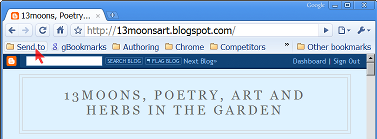
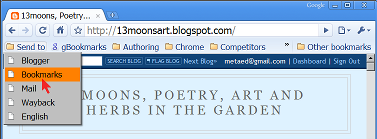
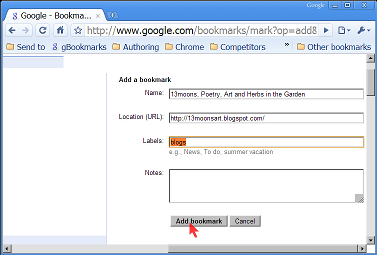
To Google bookmark a page in Chrome
To bookmark the current page, I click my Bookmarks button. (You can see in the screenshot that I file it under Send to, but you can put it anywhere.) I optionally edit the title and add tags to make it easy to find later, and click Add bookmark.
At this point, my Google bookmark is saved and I can access it later from anywhere.



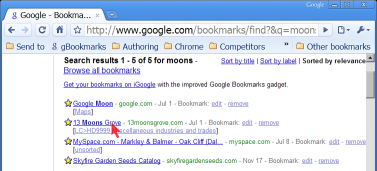
To return to a Google bookmarked page in Chrome
To find a Google bookmark page, I use search, naturally. In the address bar (a.k.a. the omnibox), I type gb (for Google Bookmark), press Tab or Space, type search word(s) that match the bookmark name or tags, and press Enter. On the results page, I click the bookmark I wanted.
To add these customizations to Google Chrome
To create the Bookmarks button, drag this bookmarklet to the Google Chrome bookmarks bar: Google Bookmark (or do the same thing from Google’s help page Bookmarks: Using Google Bookmarks, which is where I got it).
You can, of course, add the bookmarklet to a folder, as I did.
To add Google Bookmark search to the Chrome address bar, right-click in the address bar, choose Edit search engines…, click Add, fill out the form as follows, and click OK:
- Name:
- Google Bookmarks
- Keyword:
- gb
- URL:
- http://google.com/bookmarks/find?&q=%s
(In the Search Engines window there is also an option to make this the default search, if you wish.)
Comments on your experiences with this customization (and on the way it is presented above) would be most welcome!
Labels: address bar, bookmarklet, bookmarks, Chrome, customization, Google, Google Bookmarks, Google Chrome, omnibox, search, Search Engines
(go to complete article)
Share:


about.me
Follow


vs.


Recent Articles
Open letter re: Grinnell College alumni “lifetime”...
Spybot – Search & Destroy interferes with Lync 201...
Howard Schultz of Starbucks: firm on support for m...
In each of us, two natures are at war
Clorox does not understand how to measure bleach
Archives
November 1999June 2000
July 2000
September 2001
October 2001
February 2002
March 2002
June 2003
February 2004
June 2004
July 2004
August 2004
September 2004
February 2005
March 2005
November 2005
July 2007
March 2008
April 2008
May 2008
October 2008
November 2008
December 2008
January 2009
April 2009
September 2009
December 2009
February 2010
March 2010
May 2010
June 2010
September 2010
October 2010
November 2010
December 2010
January 2011
April 2011
June 2011
July 2011
August 2011
September 2011
December 2011
February 2012
April 2012
May 2012
June 2012
July 2012
August 2012
September 2012
November 2012
January 2013
February 2013
April 2013
February 2014
May 2014
October 2014
June 2017
February 2019
Finish each day and be done with it. You have done what you could. Tomorrow is a new day; begin it well and serenely and with too high a spirit to be encumbered with your old nonsense. —Ralph Waldo Emerson
Sometimes they fool you by walking upright.
What part of “Ph’nglui mglw’nafh Cthulhu R’lyeh wgah’nagl fhtagn” don’t you understand?
Build a man a fire, and he’ll be warm for a day. Set a man on fire, and he’ll be warm for the rest of his life. —Terry Pratchett
Never try to teach a pig to sing; it wastes your time and it annoys the pig. —Robert Heinlein
Do not ask why the past was better than the present, for this is not a question prompted by wisdom. —Ecclesiastes 7:10
Power lines abruptly stopped causing cancer in 1997 after the U.S. National Cancer Institute conducted a better study. —Robert Parks
Встретимся под столом! (Vstretimsja pod stolom: To meeting you under the table!)
The more you cry, the less you’ll pee.
Relish the love of a good woman.
It’ll never get better if you keep picking at it. —advice from Judge “Maximum” Bob Gibbs